Your notes
Structured notes Pro
updated
A Pro toggle that turns your summary's Decisions and Action Items into extracted items, each grounded in a verbatim transcript quote, with the speaker and timestamp when Oris can pin them.
A summary that says “decided to ship Friday” is useful. One that shows the sentence where someone said it is checkable, and checkable is what makes meeting notes worth trusting. Structured notes replace the model’s prose Decisions and Action Items with items extracted from the transcript under strict rules: every item must carry a verbatim quote from the conversation, owners and due dates are kept only when someone stated them, and anything the transcript can’t back up is dropped rather than shipped.
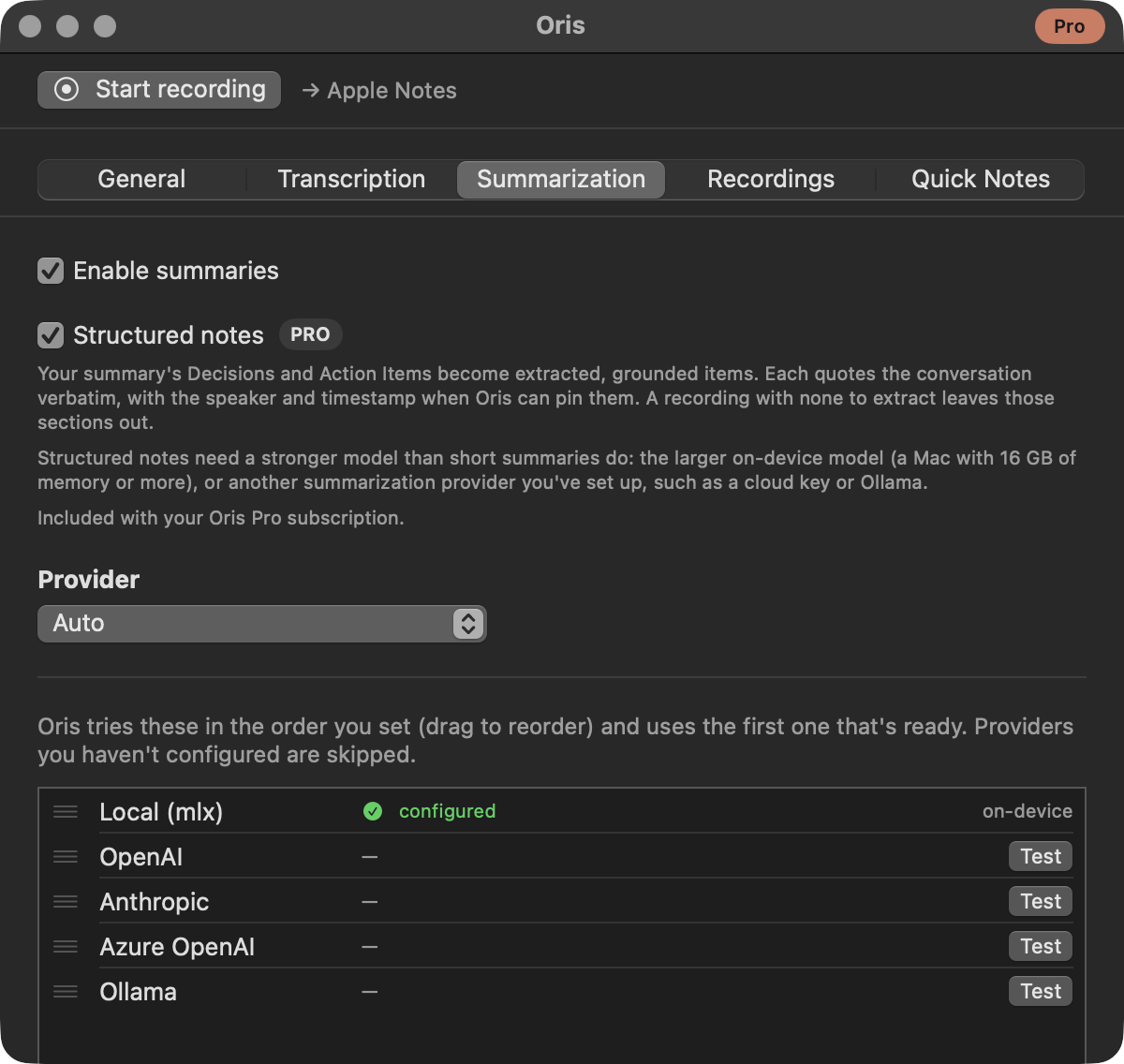
Turn it on in the Oris app under Settings → Summaries, where the toggle is labelled Decisions & action items — what it adds to the note. It ships off, because extraction adds one more model pass per recording — turning it on is your call rather than a surprise slowdown. It is part of Oris Pro, free in beta; without Pro the toggle is locked — a lock beside its Pro badge — and the signup banner below the window is the way in.
What changes in your note
With the toggle on, a summary’s Decisions and Action Items sections are replaced by extraction’s items whenever extraction delivers. Here is the same stretch of a pilot-planning call both ways. Without structured notes, the model writes prose:
### Decisions
- Agreed to require local summarization for the pilot.

### Action items
- Dana to check the hardware list.
With them, those sections become items the transcript can prove — each decision a statement with its supporting quote, each action item a task with its owner and due date when someone actually said them:
### Decisions
- Local summarization is a hard requirement for the pilot. — _"Pin-local goes in the rollout doc as a hard requirement. Agreed — it goes in the setup checklist every pilot researcher gets."_ (others, 16:17)

### Action items
- [ ] Check the asset list for hardware holdouts — **Dana**, by end of day — _"Dana, can you check the asset list today? I'd rather pick five people who already have the hardware than wait on a refresh. By end of day."_ (others, 33:09)
In the same run the model also proposed items it could not back with a verbatim quote; those were dropped, not shipped — that trade is the feature, and the rules below spell it out.
The rest of the summary (the TL;DR, open questions, topics, notable quotes) stays the model’s prose, which is what it’s good at. None of this ever touches the transcript below the summary: that part of your note is assembled outside the model, exactly as before.
Templates control where these sections land, never what’s in them. The built-in Meeting minutes and One-on-one templates place the extracted items under their own Decisions / Action Items headings, and your own templates can do the same: the template editor’s per-section Content picker offers Written by the model, Decisions, or Action items. Templates whose headings ask the model for something different, like Sales discovery’s “Next Steps” or Journal / dictation’s “Todos”, keep their model-written prose.
The rules behind it
- Every item is grounded. An item without a verbatim, position-verified quote from your transcript is dropped. This is what stops the model from “extracting” a decision nobody made.
- Unknown stays unknown. Owners and due dates are never invented. If nobody said who or when, the item shows the task and the quote and leaves it at that. The speaker and timestamp beside a quote appear when Oris can derive them from the transcript; an imported transcript with no speaker labels, or a quote that lands before the first timestamp, renders without them. On group calls the labels stay as coarse as the transcript’s own me/others split, so attribution never claims more precision than the recording has.
- The quote is your check. No automatic rule can catch a real quote attached to a conclusion the conversation never actually reached, which is why the quote always renders beside the claim. If they don’t match, trust the quote.
The feature suits meetings where decisions and commitments were actually made. A rambling brainstorm may extract to nothing, and “no decisions were made” is a valid answer rather than an error.
What it needs, and what happens when it can’t run
Structured notes want a stronger model than short summaries do. That means the larger on-device model, which needs a Mac with 16 GB of memory or more, or another summarization provider you’ve set up: a cloud key, or Ollama. That floor is measured rather than cautious: the small model that handles short summaries fine failed extraction almost half the time in testing, so Oris refuses to serve this feature with it. If you’ve pinned a specific local model with the model override, your pin is honored instead of the size check.
On a Mac below that floor where no other provider handles the summary, extraction is skipped and your note is exactly what it would have been with the toggle off: the model writes Decisions and Action Items as ordinary prose, the same as always. The toggle’s own fine print tells you when this Mac can’t run the larger local model, and the recordings history records each skip and why, so the state is never invisible. Everything stays unchanged when the toggle is off, on every machine.
When extraction comes up empty
The model still writes Decisions and Action Items as prose on every run; extraction then replaces each section it could ground. So a recording where extraction finds nothing, fails, or is skipped mid-run (say, two summaries competing for the local model) keeps the model’s own prose in those sections — a note with structured notes on is never worse than the one the toggle-off run would have delivered. The replacement is per section, too: extraction that found decisions but no action items replaces Decisions and leaves the Action Items prose standing. What the prose versions don’t carry is the guarantee. They are the model’s words, not quoted-and-checked items, which is exactly what the notice below tells you when it applies.
If extraction actually broke, the note says so with a one-line notice beneath those sections — a caveat on prose that is present, not a report of something missing — and the recordings history records the failure. The one exception is a model you pinned yourself below the size structured notes require: those failures skip the in-note notice, because a message you can only fix by unpinning would land on note after note, and the recordings history is where they show instead. The transcript and the rest of your summary always land.
Retrying a failed summary re-runs extraction too, under your settings at retry time, and so does Re-summarize: a re-run with new instructions or a different template keeps its Decisions and Action Items extracted and quoted rather than falling back to prose, and the recording’s structured badge stays put. The extracted items also travel with the recording’s delivery record, so future integrations can read the structured data directly instead of scraping your note’s Markdown. Quick notes are out of scope; they have no summary step for sections to live in.